Python docstrings
I am a passionate and versatile Full Stack Web Developer and Technical Writer with a love for crafting innovative digital solutions and communicating complex technical concepts in a clear and engaging manner. As a technical writer, My writing style emphasizes clarity, consistency, and user-centricity, making it easier for developers and stakeholders to understand and adopt the technology.
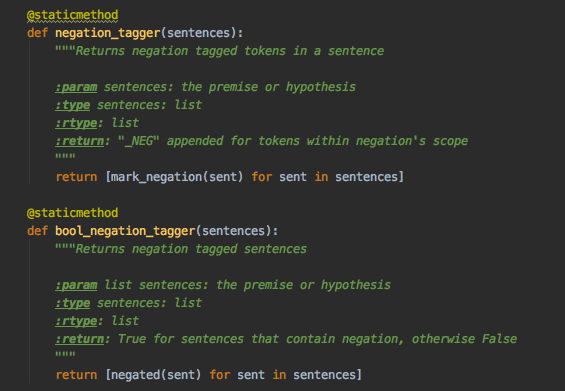
In Python, if we do not assign a variable to a string, it acts as a comment named docstring.
They are string literals that appear right after a function, module or class. They are enclosed in triple quotes.
Docstrings are built-in strings that, when configured correctly, can help your users and yourself with your project’s documentation.
Docstrings Purposes
Their purpose is to provide users with a brief overview of the object(functions, modules, classes or scripts). At a bare minimum, a docstring should be a quick summary of whatever is it you’re describing and should be contained within a single line. Beyond the summary, multi-lined docstrings are used to elaborate on the object. The following are parts of a multi-lined docstrings:
A one-line summary line (picture)
A blank line proceeding the summary
Any further elaboration for the docstring
Another blank line
The maximum length of docstrings 72 characters.
Docstrings are divided into the following categories:
Class Docstrings
Package and module Docstrings
Script Docstrings
Class Docstrings are used for class and class methods. The docstrings are placed immediately following the class or class method indented by one level:
Package and module Docstrings are placed at the top of the package’s init.py file. This docstring should list the modules and sub-packages that are exported by the package.
Scripts are single file executables run from the console. Docstrings in a script are placed at the top of the file and documented well for users to have sufficient understanding on how to use the script.